

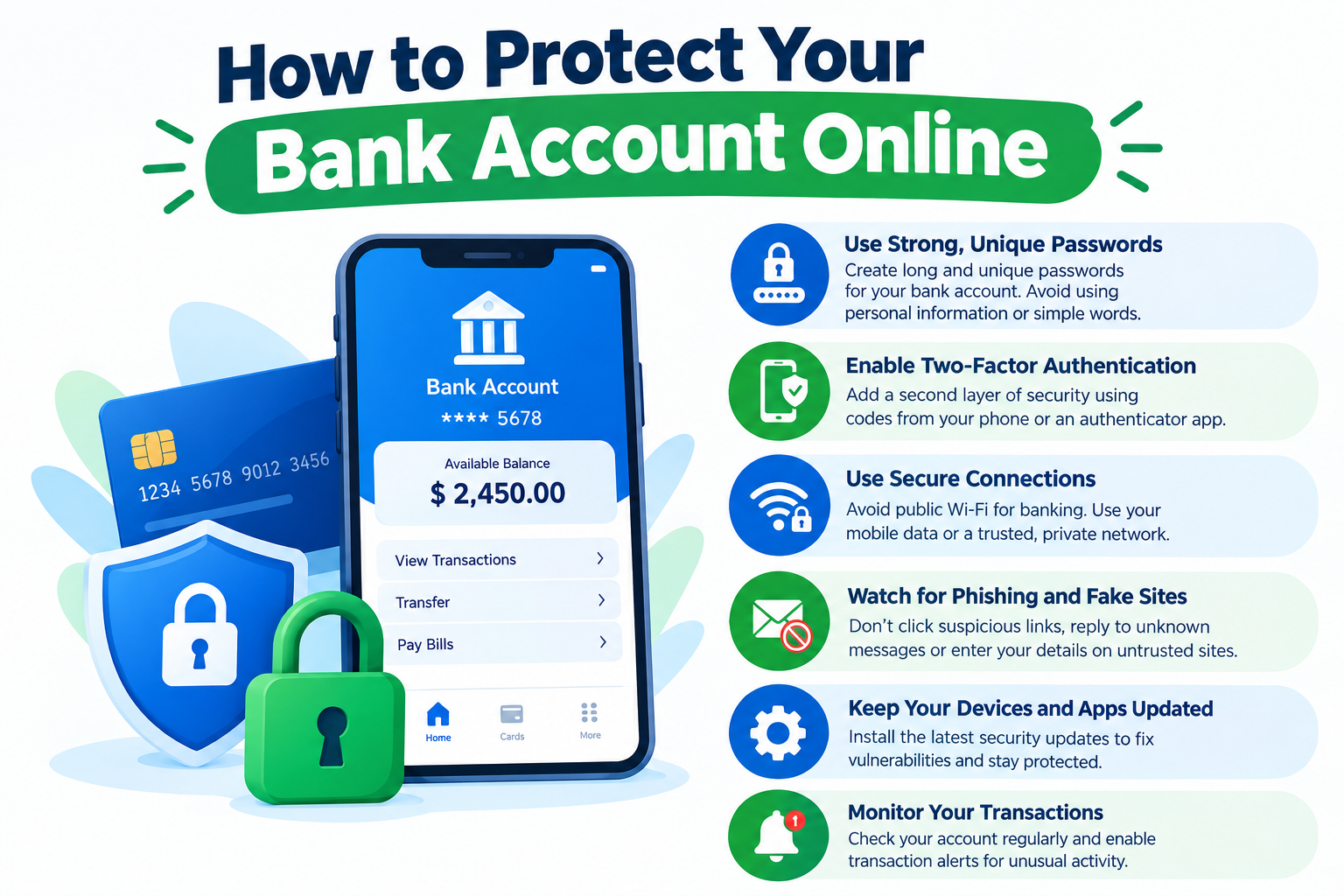
Online banking makes it easier to manage money, but it also means that customers need to protect their accounts from unauthorized access.
Bank accounts contain sensitive financial information. If criminals gain access to an account, they may attempt to steal money, obtain personal information, or use the account for fraudulent activity.
Banks use security systems to protect customers, but account holders also have an important role. Good security habits can reduce common risks and make unauthorized access more difficult.
Use a Strong and Unique Password
A strong password is one of the basic protections for an online banking account.
Avoid using simple information such as a name, birthday, phone number, or common word.
Most importantly, do not reuse the same password for banking and other websites.
If another website experiences a data breach and the same password is used for banking, criminals may try those credentials on financial accounts.
A password manager can help create and store unique passwords.
Enable Multi-Factor Authentication
Multi-factor authentication adds another security step during login.
Instead of relying only on a password, the bank may require a verification code, authentication app, security key, or biometric method.
This can provide additional protection if someone obtains the account password.
Customers should enable multi-factor authentication whenever their bank offers a suitable option.
Never Share Verification Codes
Verification codes are designed to confirm that a legitimate account holder is performing an action.
Customers should not share these codes with other people.
Scammers sometimes pretend to be bank employees and ask customers to provide a code they just received.
If someone unexpectedly asks for a banking verification code, stop the conversation and contact the bank using an official phone number or website.
Avoid Phishing Emails
Phishing is a common method used to steal login information.
A fraudulent message may claim that an account has been locked, a payment has failed, or suspicious activity has been detected.
The message may contain a link leading to a fake login page.
Instead of clicking the link, open the bank’s official website or mobile application directly.
Be Careful With Text Messages
Phishing attempts can also arrive through SMS or other messaging platforms.
A message may claim to be from a bank and ask the customer to verify a transaction.
Unexpected messages containing links should be treated carefully.
If you need to contact the bank, use contact information from an official statement, bank card, or official website.
Keep Your Devices Updated
Operating system and application updates often include security improvements.
Customers should keep their computers, smartphones, browsers, and banking applications updated.
Using an outdated device can expose users to security vulnerabilities that may have been addressed in newer software versions.
Use a Screen Lock
A secure screen lock can help protect banking information if a smartphone or laptop is lost.
Use a strong PIN, password, fingerprint, or facial recognition feature supported by the device.
Avoid leaving banking applications open when the device is unattended.
Avoid Banking on Public Computers
Public computers may not provide the same level of security as a personal device.
Keyloggers, malicious software, or browser settings could potentially expose sensitive information.
Whenever possible, use a trusted personal device for online banking.
Be Careful With Public Wi-Fi
Public Wi-Fi networks can create additional security risks.
When handling sensitive financial information, a trusted private network or mobile connection may be preferable.
Customers should also ensure that the bank’s website uses a secure connection and that they are accessing the legitimate website.
Monitor Your Account Regularly
Regular account monitoring can help identify suspicious activity.
Review transactions, transfers, withdrawals, and card purchases.
Many banks provide real-time or near-real-time notifications for certain activities.
If you see something you do not recognize, contact your bank promptly.
Turn On Account Alerts
Account alerts can notify you about important activity.
Depending on the bank, alerts may be available for:
- Large transactions
- Low balances
- Password changes
- New device logins
- Transfers
- Card purchases
- Failed login attempts
Alerts can help customers notice unusual activity sooner.
Protect Personal Information
Personal information can sometimes be used to answer security questions or support identity fraud.
Avoid publicly sharing unnecessary details such as your full date of birth, financial information, account numbers, or security answers.
Be cautious when providing personal information to websites or people you do not know.
Do Not Save Banking Passwords on Shared Devices
Saving passwords in a browser can be convenient on a private device.
However, it may create problems on shared or public computers.
Avoid saving banking credentials on devices used by other people.
Always sign out after using online banking on a shared device.
Use the Official Banking App
Download banking applications from official app stores and verify that the application belongs to the correct financial institution.
Avoid installing banking applications from links received through unexpected emails or messages.
Keep the application updated as new security fixes become available.
Watch for Fake Customer Support
Scammers sometimes create fake customer-support numbers, websites, social media accounts, or advertisements.
If you need assistance, use contact details from your bank’s official website, account statement, or bank card.
Do not trust unexpected callers who ask for passwords, verification codes, or remote access to your computer.
Be Careful With Remote Access Requests
A scammer may claim that they need remote access to fix a banking problem.
Do not give unknown individuals control of your computer or smartphone.
Legitimate support channels should be verified independently before taking action.
What to Do If Your Account Is Compromised
If you believe someone has accessed your bank account without permission, contact your bank immediately.
Depending on the situation, the bank may secure the account, block cards, investigate transactions, or recommend changing credentials.
Change affected passwords and review other accounts if the same password was reused elsewhere.
If personal information was exposed, follow appropriate identity-protection steps and monitor accounts for suspicious activity.
Protect Your Email Account
Your email account can be important because banks may use it for notifications and account recovery.
Use a strong, unique password and multi-factor authentication for your email account as well.
If someone gains control of your email, they may attempt to reset passwords for other online services.
Avoid Clicking Unexpected Links
One of the simplest security habits is to avoid clicking unexpected links.
If a message claims there is an issue with your bank account, do not use the message’s link to investigate.
Instead, open your banking application or manually visit the bank’s official website.
Final Thoughts
Protecting a bank account online requires both technology and good habits.
Strong passwords, multi-factor authentication, updated devices, secure networks, account alerts, and regular transaction monitoring can all contribute to better account security.
Customers should also remain cautious about phishing emails, suspicious text messages, fake support calls, and requests for verification codes.
No security method eliminates every risk, but careful online behavior can significantly reduce opportunities for unauthorized access.
Frequently Asked Questions
What is the safest way to access online banking?
Use the bank’s official website or mobile application on a trusted, updated device.
Should I enable two-factor authentication?
If your bank offers multi-factor authentication, enabling it can add another layer of account protection.
Can a bank employee ask for my password?
You should not share your online banking password with anyone. If you receive an unexpected request, contact the bank through an official channel.
What should I do if I click a suspicious banking link?
Contact your bank if you entered sensitive information, change affected credentials, and monitor the account for unusual activity.
How often should I check my bank account?
Regular monitoring is useful. Many customers also enable alerts so they can receive notifications about important transactions automatically.

Leave a Reply